
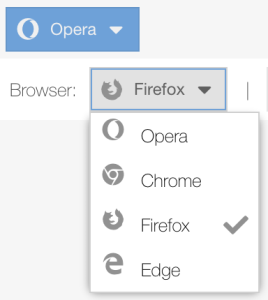
 Menu button is a mix of combobox and button. It changes the text and icon on menu check item click. You can use to show some state of your application: used theme (dark or light) or some view profile of grid panel. I have implemented getter and setter methods.
Implemented for ExtJs 7.4 classic toolkit.
Ext.define('MenuButton', {
    extend: 'Ext.button.Button',
    alias: 'widget.menubutton',

    initComponent: function () {
        this.callParent();
        this.text = this.getCheckedMenuItem().text;
        this.iconCls = this.getCheckedMenuItem().iconCls;
        this.initCheckItemCheckChangeEvents();
    },

    getCheckedMenuItem: function () {
        return this.getMenu().query('menuitem[checked]')[0];
    },

    initCheckItemCheckChangeEvents: function () {
        Ext.Array.each(this.getMenu().query('menuitem'), function (menuCheckItem) {
            menuCheckItem.on('checkchange', this.onMenuCheckItemCheckChange, this)
        }, this);
        return this;
    },

    onMenuCheckItemCheckChange: function (menuCheckItem, checked) {
        this.setText(menuCheckItem.text);
        this.setIconCls(menuCheckItem.iconCls);
        return this;
    },

    getInputValue: function () {
        return this.getCheckedMenuItem().inputValue;
    },

    setInputValue: function (inputValue) {
        Ext.Array.each(this.getMenu().query('menuitem'), function (menuCheckItem) {
            if (menuCheckItem.inputValue === inputValue) {
                menuCheckItem.setChecked(true);
            }
        }, this);
        return this;
    }
});
Usage sample:
Ext.application({
    name: 'Fiddle',

    launch: function () {
        Ext.create('MenuButton', {
            margin: 5,
            menu: {
                xtype: 'menu',
                defaults: {
                    xtype: 'menucheckitem',
                    group: 'radioGroup',
                },
                items: [{
                    text: "Opera",
                    iconCls: 'fab fa-opera',
                    checked: true
                }, {
                    text: "Chrome",
                    iconCls: 'fab fa-chrome'
                }, {
                    text: "Firefox",
                    iconCls: 'fab fa-firefox'
                }, {
                    text: "Edge",
                    iconCls: 'fab fa-edge'
                }]
            },
            renderTo: Ext.getBody()
        });
        Ext.create('Ext.toolbar.Toolbar', {
            renderTo: Ext.getBody(),
            items: [{
                xtype: 'label',
                text: "Browser: "
            }, {
                xtype: 'menubutton',
                itemId: 'menubutton',
                menu: {
                    xtype: 'menu',
                    defaults: {
                        xtype: 'menucheckitem',
                        group: 'radioGroup',
                    },
                    items: [{
                        text: "Opera",
                        iconCls: 'fab fa-opera',
                        inputValue: 'opera',
                        checked: true
                    }, {
                        text: "Chrome",
                        iconCls: 'fab fa-chrome',
                        inputValue: 'chrome',
                    }, {
                        text: "Firefox",
                        iconCls: 'fab fa-firefox',
                        inputValue: 'firefox',
                    }, {
                        text: "Edge",
                        iconCls: 'fab fa-edge',
                        inputValue: 'edge',
                    }]
                }
            }, '|', {
                xtype: 'button',
                text: "Select Firefox",
                handler: function () {
                    const menuButton = this.up('toolbar')
                        .getComponent('menubutton');
                    menuButton.setInputValue('firefox')
                }
            }, {
                xtype: 'button',
                text: "Show selection",
                handler: function () {
                    const menuButton = this.up('toolbar')
                        .getComponent('menubutton');
                    const inputValue = menuButton.getInputValue();
                    Ext.toast(
                        inputValue,
                        "Selected input value"
                    )
                }
            }]
        })
    }
});